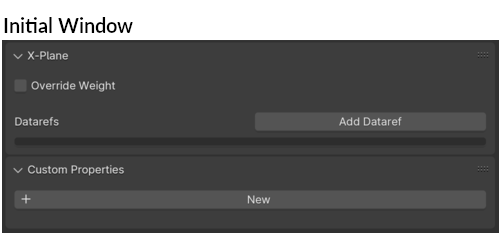
Bone Tab Settings
NOTE
Unless an Armature is present in the Blender scene, the Armature / Bone Property Tabs will NOT be visible.
Blender's Armature Properties Tab have an XP2B X-Plane panel on it, BUT it does not contain any widgets. Only Blender's Bone Property Tab have XP2B widgets on it.
General
The Bone tab widgets are used to assign Datarefs and Virtual Commands to Armature Bone Entities which drive Mesh Object animations. Bones are the preferred animation entity for:
- Rotation animations where the rotation axis is NOT on a principle orthogonal axis, such as knobs on an inclined panel.
- Kinematic assemblies / mechanisms, i.e. landing gear or complex cabin doors, where skeleton armatures may be more appropriate.
- Any time you want to decouple your animations from your Mesh Object. For example, perhaps you want to work on animating the landing gear early on in a project, but do so with simple "placeholder" Mesh Objects. Using bones, you can preserve your animation work and worry about the attached 3D Meshes later.
This tab is also used to record keyframe values on animated Bones that have keyframes set on them.
Armatures vs. Bones
Frequently there is confusion by users as to what exactly is a Bone versus an Armature. Blender have property tabs for each entity type. The following illustration will help clarify some concepts going forward. For purposes of using XP2B to animate Mesh Objects in Blender however, we are only concered with Bones, not Armatures.
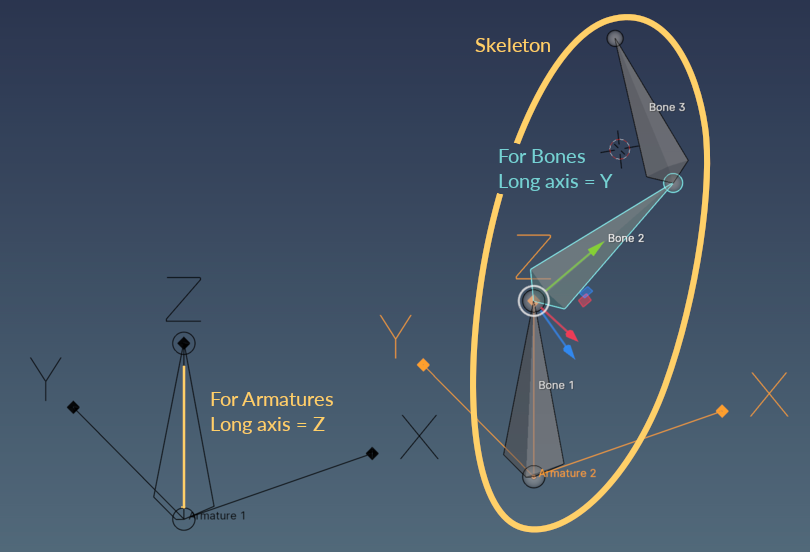
Some helpful points to keep in mind going forward:
- An armature is a parent level "container" entity. Bones are "child members" of armatures. An armature always contains at least one bone, but more may be added.
- A skeleton is an armature with multiple bones in it. (Typical for for kinematic animations).
- The long axis of an Armature (Z) is not the same as the long axis of a Bone (Y). This becomes quite relevant when animating rotations with non-orthogonal rotation axes.
- Selecting an armature is NOT the same as selecting a bone. Bones are selected in a special selection mode called Pose Mode.
- Using the Add Dataref Button to add an animation dataref to a selected armature/skeleton will only add the new dataref to the last bone created.
Bone Tab UI Browser