Light Tab Settings
General
The Light Tab is most commonly used to designate a Blender spot or point light to be either an X-Plane Named Light or a Parameter Light. A Named Light's appearance is completely fixed and not configurable, whereas a Parameter Light's appearance can be customized through parameters.
The most common parameter variables are a light's color, intensity, directionality and for spot lights, their cone width, but a few other parameters exist for some light types. The parameters available for a given Light is dependent upon its type. A full list of parameters is given below
XP2B supports a simple form of WYSIWYG visualization for Parameter lights, meaning that XP2B will derive some of the parameters of the light from Blender's light settings, rather than a XP2B widget. This means you need to pay attention to Blender's light properties when setting up your Parameter lights.
The Blender light type must be compatible with the Name you provide or XP2B will present an error message. Only point and spot type Blender lights are utilized by XP2B. You can learn more about Light types in the Workflows > Lighting section of this manual.
While XP2B has a provision to enter customized lighting parameters, this is a deprecated practice. Using Named / Parameter lights is the modern method.
A list of valid X-Plane Lights, both Named and Parameter Types are provided below for reference. For advanced users familiar with X-Plane's lighting system, there is also a copy of the lights.txt file in the Appendix
NOTE
X-Plane's lighting system has evolved over the years, with older named/parameter lights becoming deprecated, meaning they are still available, but essentially obsolete and not preferred compared to modern XP12 Named/Parameter lights. The XP2B pulldown menu illustrated below for selecting the light type still have many options, but in most all cases, 'Automatic' will be the appropriate selection. Deprecated options will eventually be removed from XP2B.
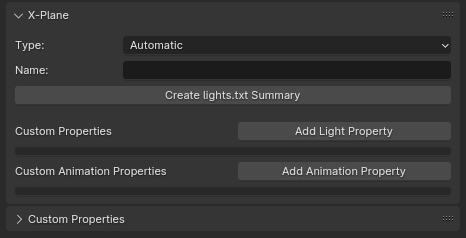
Light Tab UI Browser
Light Type Pulldown Options
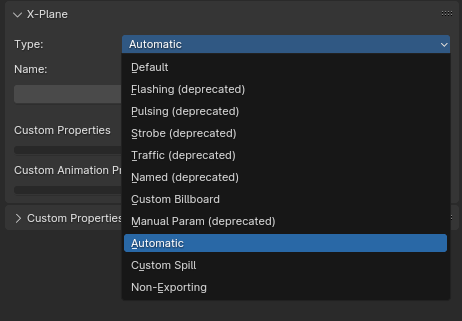
The following 12 options are available in the Type pulldown menu. Most are deprecated. 'Automatic' and 'Non-Exporting' are typically the only relevant options utilized.
Incompatible Light Types.
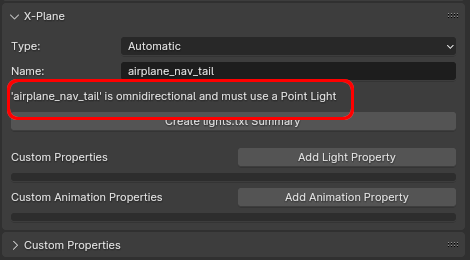
The image below shows XP2B error message whenever the Blender light type is not compatible with the Named Light provided in the Name field. This validity check is performed by XP2B whenever moving cursor focus out of the Name field or when changing light types.