Glass & Transparencies
General
Alpha Blending / Cutoff
- Use Cases
- Shadow Glass
- Stained Glass
- Dirty Glass
Weight / Draw Order
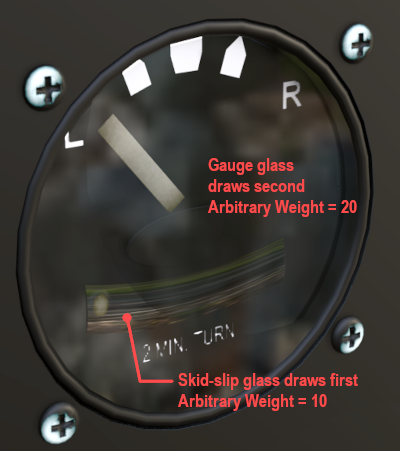
When working with transparent objects, especially multiple transparent objects where you need to see through layers of transparent polygons, then draw order of the polygons is critical. You can control the draw order of such polygons by using a weighting value in XP2B.
The Override Weight checkbox is used to assign a weighting value to the selected Mesh Object. Weighting values are arbitrary and only exist within Blender and are not exported to the OBJ. Blender Mesh Objects with weight values will be exported in numerical order and will always be drawn after Mesh Objects with no weighting value.
Using weighting values, you can control the draw order of Mesh Objects. This is generally necessary when you have multiple transparent surfaces and must draw the surface furthest from the camera first. e.g. the turn-slip ball glass needs to draw before the gauge face glass, etc. If the option to print debug comments is enabled, then the weighting value of the Mesh Object will be output in the OBJ file.